





Back to blog
Injection Moulding Machine Controllers: Generations Explained
Dec 10, 2025
Ing. Andrea Balajová


A practical guide to ARBURG, ENGEL, KraussMaffei, Demag and Wittmann Battenfeld control systems
When searching for a used injection moulding machine, buyers usually compare clamping force, screw diameter, shot capacity, production year and operating hours.
But there is one important specification that is often overlooked: the machine’s control system.
Consider two injection moulding machines from the same manufacturer, with similar specifications and comparable operating hours. One might be equipped with an older controller, while the other features a newer generation with improved process monitoring, automation interfaces and data management.
Although their mechanical specifications may be almost identical, their suitability for a particular production environment can be very different.
A control system affects much more than the way an operator enters parameters. It can determine how production sequences are programmed, how mould settings are stored, which robots can be connected, how process data is monitored and how easily a machine can be maintained.
For buyers of second-hand equipment, understanding controller generations can also help identify the approximate technological generation of a machine.
In this guide, we examine the development of injection moulding machine controllers from five major European manufacturers:
- ARBURG: SELOGICA and GESTICA
- ENGEL: CC100, CC200, CC300 and CC300 plus
- KraussMaffei: MC1 through MC6
- Demag: NC4, NC5 and NC5+
- Wittmann Battenfeld: UNILOG B2, B4, B6, B8 and B8X
More importantly, we explain how to recognise these systems, what makes them different and what to check before buying a machine equipped with one.
1. Understanding Injection Moulding Machine Controllers
What Does an Injection Moulding Machine Controller Actually Do?
An injection moulding machine controller is responsible for coordinating the machine’s movements and processing parameters.
Depending on the machine and its configuration, the controller manages functions such as:
- Injection speed and pressure profiles
- Screw rotation and plasticising parameters
- Holding pressure and holding time
- Clamping unit movements
- Ejector and core-pulling sequences
- Barrel and mould temperature control
- Process monitoring and alarm management
- Storage of mould settings and production recipes
- Communication with robots and peripheral equipment
Modern controllers may also support production monitoring, automatic parameter adjustment, quality documentation and communication with manufacturing execution systems (MES).
However, the controller’s commercial name alone does not guarantee that all these functions are available.
Manufacturers often offer optional software packages, additional interface modules and different hardware configurations within the same controller generation.
This distinction is particularly important when purchasing used equipment.
Controller Generation vs. Machine Production Year
One of the most common mistakes is assuming that a machine’s production year identifies its controller.
For example, ARBURG introduced GESTICA in 2016, but this does not mean that every ARBURG machine manufactured after 2016 was equipped with GESTICA.
Manufacturers frequently introduce new controllers gradually across their machine ranges. Older and newer control systems may therefore be available simultaneously.
The reverse is also possible: an older machine may have received a controller upgrade during its operating life.
Practical rule: Never identify an injection moulding machine controller solely by the machine’s year of manufacture.
Always check the installed system directly.
2. ARBURG Controllers: SELOGICA and GESTICA Explained
German manufacturer ARBURG is particularly well known for its ALLROUNDER injection moulding machines.
Its control philosophy has evolved considerably over the decades, with SELOGICA and GESTICA representing two important milestones.
ARBURG SELOGICA — Introduced in 1992
ARBURG introduced its SELOGICA control system in 1992.
At the time, its graphical approach to programming machine sequences represented a major development in injection moulding machine operation.
Instead of relying exclusively on traditional parameter tables, SELOGICA allows machine processes to be represented through graphical sequence programming.
What Makes SELOGICA Different?
One of the defining features of SELOGICA is its graphical programming concept.
An injection moulding cycle involves a sequence of interconnected operations.
For example:
- Close the mould.
- Build up clamping force.
- Move the injection unit forward.
- Inject material.
- Apply holding pressure.
- Cool the moulded part.
- Open the mould.
- Activate the ejector.
- Return the ejector.
- Begin the next cycle.
On a machine equipped with SELOGICA, these operations can be configured using graphical sequence elements.
The system also performs plausibility checks intended to identify conflicting or inappropriate sequence configurations.
This is particularly useful when programming more complex applications involving core pulls, additional movements or automation equipment.
Are All SELOGICA Controllers the Same?
No.
This is a particularly important detail for buyers of used ARBURG machines.
SELOGICA is a control-system family that evolved over many years, not one unchanging hardware configuration.
Different machines may have different display designs, operating panels, control hardware, software versions and optional functions.
You may also encounter designations such as SELOGICA direct or SELOGICA ND in ARBURG documentation.
Therefore, when comparing two machines equipped with SELOGICA, the controller name alone is insufficient.
The exact configuration should be established from the machine documentation and system information.
Which ARBURG Machines Use SELOGICA?
SELOGICA has been used across multiple generations of ARBURG ALLROUNDER machines.
Examples include machines from the ALLROUNDER C and S families, as well as various later ALLROUNDER configurations.
However, the machine series alone does not establish the exact controller hardware or software version.
For example, knowing that a machine is an ALLROUNDER 470 C tells you considerably less about its electronic configuration than knowing its production year, controller variant and software version.
What Should Buyers Check on a Used SELOGICA Machine?
1. Display and operating panel
Check that the screen remains readable, without intermittent image loss, significant display defects or unstable operation.
Test frequently used buttons and other operating elements.
2. Programme storage and retrieval
Ask the seller to demonstrate how an existing mould setting is stored and retrieved.
Confirm that settings remain available after a normal machine restart.
3. Software version
Request the controller’s software identification.
This may become important when replacing electronic components, restoring backups or investigating compatibility with other machines.
4. Peripheral-equipment interfaces
Do not assume that every SELOGICA machine can communicate with the same robot or production monitoring system.
The relevant hardware, software and interface options must be verified.
5. Electronic spare parts
Investigate the availability of replacement components for the specific controller version.
A functioning older controller is not necessarily a problem. However, limited availability of compatible electronics can significantly affect repair costs and downtime.
ARBURG GESTICA — Presented in 2016
ARBURG introduced GESTICA at the K 2016 trade fair together with its ALLROUNDER 1120 H.
GESTICA represented a major redesign of the operator interface, while retaining fundamental elements of the SELOGICA programming philosophy.
SELOGICA vs. GESTICA: What Actually Changed?
The most visible difference is the operating interface.
GESTICA uses a modern graphical environment with a high-resolution display, multi-touch functionality and gesture-based interaction.
Its design was intended to make complex machine operations easier to understand and navigate.
But the differences extend beyond appearance.
1. Graphical Interaction
SELOGICA introduced graphical sequence programming.
GESTICA retains this fundamental concept while providing a more modern interface for navigating functions, viewing information and interacting with the machine.
Operators familiar with SELOGICA may therefore recognise important elements of the programming philosophy, although training is still advisable.
2. Operating Ergonomics
GESTICA introduced an ergonomically adjustable operating panel and a user interface designed around modern interaction methods.
This can be particularly useful in environments involving frequent mould changes and regular operator intervention.
3. Assistance Functions
GESTICA supports advanced assistance functions intended to help operators configure and optimise machine processes.
The exact functions available depend on the machine’s equipment and software configuration.
4. Production Integration
GESTICA was developed with modern production environments in mind, including more advanced data handling and integration possibilities.
However, actual connectivity must still be verified for each machine.
ARBURG SELOGICA vs. GESTICA
| Feature | SELOGICA | GESTICA |
| Introduction | 1992 | Presented in 2016 |
| Operating concept | Graphical sequence programming | Graphical sequence programming with redesigned user interface |
| Display technology | Depends on version | Modern high-resolution multi-touch interface |
| Gesture operation | Not a defining feature | Yes |
| Plausibility checking | Yes | Yes |
| Assistance functions | Version- and option-dependent | Expanded modern assistance concept |
| Automation integration | Configuration-dependent | Configuration-dependent |
| Typical used-machine relevance | Broad range of older and later ALLROUNDER machines | Newer compatible ALLROUNDER generations |
Can You Transfer Mould Programmes Between SELOGICA and GESTICA?
This is a question worth asking before purchasing a newer ARBURG machine to replace an existing one.
The two control systems share important elements of their programming philosophy, but this does not mean every stored programme can be transferred directly without conversion, modification or verification.
Compatibility depends on factors including:
- Software versions
- Machine configuration
- Available movements and hydraulic or electric functions
- Installed options
- Peripheral equipment
- Differences in the physical machine
Practical recommendation: If transferring existing mould programmes is essential, ask ARBURG to verify compatibility using the exact machine configurations and software versions.
Do not rely solely on the fact that both machines belong to the ALLROUNDER family.
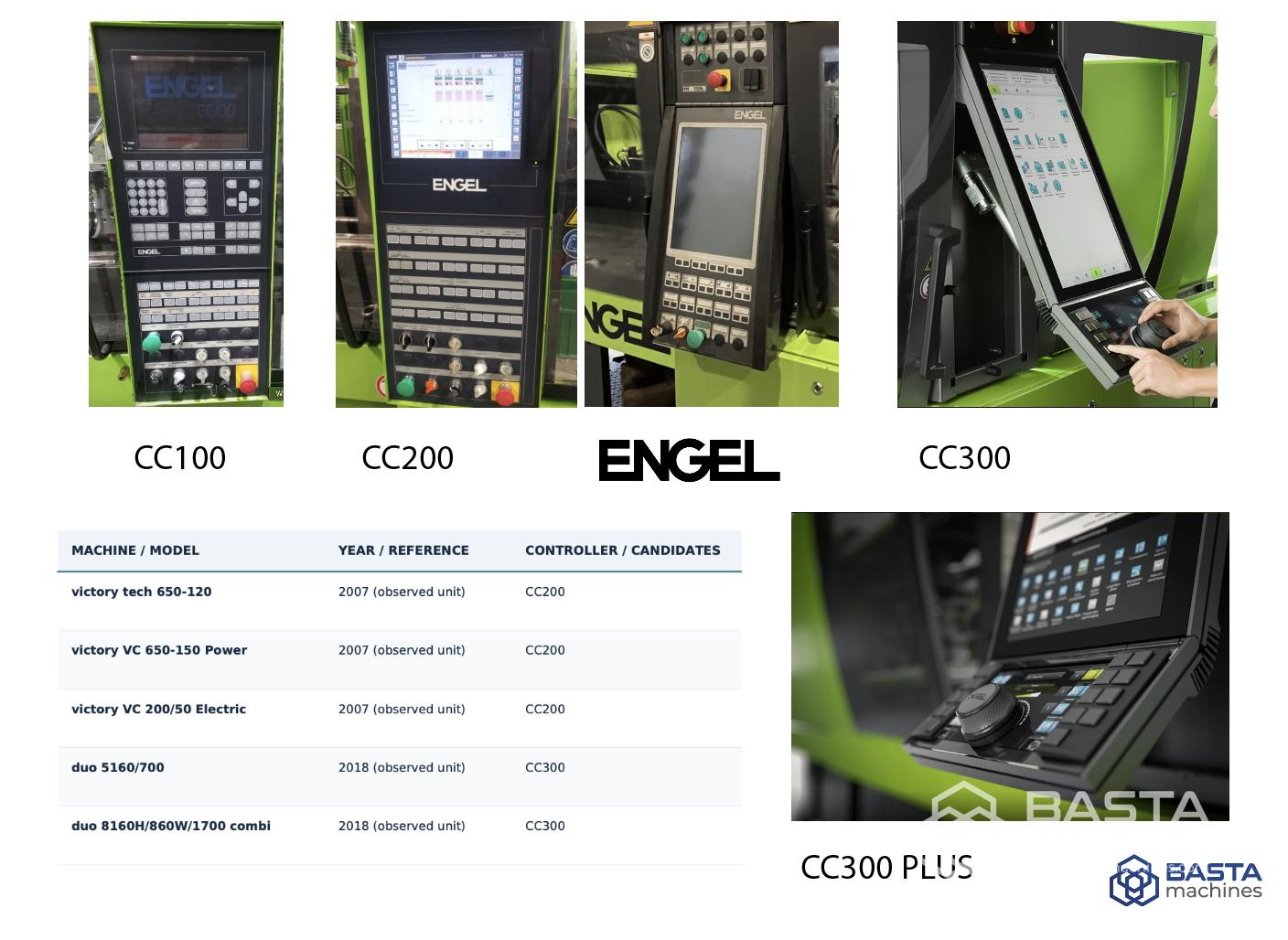
3. ENGEL Controllers: CC100, CC200, CC300 and CC300 plus
Austrian manufacturer ENGEL has developed several generations of machine controllers under the CC designation.
The transition from CC100 and CC200 to CC300 marked a particularly significant change in operator interaction.
ENGEL CC100 — Earlier Controller Generation
CC100 belongs to an earlier generation of ENGEL electronic control systems.
It can be encountered on older ENGEL injection moulding machines, including machines from earlier generations of the company’s established product families.
Its operation reflects the control technology available when those machines were manufactured.
Compared with current systems, the interface is more traditional, and available functionality depends heavily on the individual machine configuration.
What Should You Know About CC100?
When buying a CC100-equipped machine, its main limitation is not necessarily the control philosophy itself.
A properly maintained machine may still be suitable for straightforward production.
The more important questions concern its electronics and long-term maintainability.
For example:
- Is the operating panel fully functional?
- Can all machine parameters be accessed?
- Are stored mould settings retained reliably?
- Are compatible replacement electronic components available?
- Is the required service documentation included?
For older controllers, the condition and supportability of the electronics may be more important than the appearance of the operator interface.
ENGEL CC200 — The Next Generation
CC200 succeeded the earlier CC100 family and became an established controller on ENGEL injection moulding machines.
It can be found on numerous used machines, including configurations from the ENGEL victory, duo and other product families.
Its development brought improvements in machine operation, parameter management and integration possibilities.
However, CC200 itself existed in different configurations and software versions.
CC100 vs. CC200: What Is the Practical Difference?
The most relevant improvement is the evolution of the control environment and the way machine functions are presented and managed.
CC200 offers a more developed operating concept than the earlier generation.
But it would be misleading to claim that every CC200 machine supports a specific function that no CC100 machine could provide.
ENGEL offered different configurations and optional features, and individual machine capabilities must be checked against their technical documentation.
Can You Transfer Programmes from CC100 to CC200?
Do not assume direct compatibility.
Even where parameter data can be transferred or adapted, differences in machine equipment and controller software may require verification or reconfiguration.
A successful file transfer does not necessarily mean that the receiving machine will reproduce the same process without adjustment.
If programme migration is important, request a compatibility assessment before purchasing the replacement machine.
ENGEL CC300 — Introduced in 2013
ENGEL introduced its CC300 controller at K 2013.
Unlike a simple update to the previous interface, CC300 introduced a substantially redesigned approach to machine operation.
What Makes CC300 Different?
The key concept is operation organised around the user’s tasks and the individual components of the production cell.
This allows operators to work with machine functions and integrated equipment in a more coordinated environment.
1. The e-move Control Element
One of CC300’s most distinctive features is e-move, a rotary operating element used for controlling machine movements.
Instead of relying exclusively on conventional individual movement buttons, the operator can use e-move to control selected movements within the machine’s operating concept.
This is particularly relevant during mould setup and manual operation.
The exact available movements depend on the configuration and safety conditions.
2. A Modern Operator Interface
CC300 introduced a redesigned interface with an emphasis on clear navigation, operator tasks and graphical information.
The controller family uses a large touchscreen display and adjustable operating arrangement.
This can reduce the complexity of navigating between machine functions.
3. Integrated Production Cells
CC300 was designed to support the operation of more complex production cells.
Depending on the machine configuration, integrated automation can be operated within the control environment.
This is useful when working with ENGEL robots or additional equipment.
However, compatibility with a particular robot must always be established individually.
4. Operator Personalisation
CC300 supports user-oriented interface arrangements and configurable operating functions.
Such functionality can be useful when several operators with different responsibilities work with the same production equipment.
ENGEL CC300 plus — Introduced in 2023
ENGEL presented CC300 plus at Fakuma 2023.
Despite its name, CC300 plus is not an entirely unrelated controller family.
It is an evolution of the CC300 operating concept, with particular attention to ergonomics and manual machine operation.
What Changed from CC300 to CC300 plus?
1. Three-part operating panel
The CC300 plus operating unit consists of three main sections:
- Switch-on panel
- Visualisation panel
- Manual pushbutton panel
These sections are connected through an adjustable mechanism.
2. Improved positioning
The operating panels can be positioned independently, improving accessibility during different working tasks.
3. Configurable pushbuttons
The new manual panel includes eight pairs of pushbuttons.
These can be assigned to different functions, allowing operators to configure controls for tasks such as robot operation, core movements or other machine functions.
4. Improved e-move interaction
CC300 plus provides additional visual information about the selected movement sequence.
This makes it easier for operators to understand which movement will be executed.
5. User-specific settings
The operating arrangement supports user-specific positioning and access functions.
Can Existing CC300 Machines Be Upgraded to CC300 plus?
Yes — ENGEL explicitly offers this possibility.
According to ENGEL, machines equipped with CC300 can be upgraded to the CC300 plus operating unit.
However, the scope, cost and feasibility of a particular upgrade should be confirmed with the manufacturer.
This is an important advantage when evaluating certain used ENGEL machines.
ENGEL Controller Comparison
| Feature | CC100 | CC200 | CC300 | CC300 plus |
| Generation | Earlier | Successor to CC100 | Introduced 2013 | Introduced 2023 |
| Operating interface | Traditional | Developed electronic interface | Modern task-oriented interface | Enhanced CC300 interface |
| e-move | No | No | Yes | Yes, with enhanced interaction |
| Three-part adjustable panel | No | No | No | Yes |
| Configurable modern manual panel | No | Version-dependent controls | Yes, different arrangement | Eight pairs of configurable pushbuttons |
| Automation capabilities | Configuration-dependent | Configuration-dependent | Integrated automation concept | Integrated automation concept |
| Modernisation | Individual assessment | Individual assessment | CC300 plus upgrade offered | Current CC300-family development |
Which ENGEL Controller Should You Choose?
For straightforward production on a well-maintained machine, an older controller may be entirely sufficient.
If the production environment involves frequent mould changes, extensive manual setup or integrated automation, CC300 may offer practical advantages.
CC300 plus is particularly interesting where operator ergonomics and frequently repeated manual movements are important.
For used-machine buyers, the most important question is not simply CC200 versus CC300, but whether the specific machine provides the functions required by the intended application.
4. KraussMaffei Controllers: MC1 to MC6
KraussMaffei provides one of the clearest documented histories of injection moulding machine control development.
The manufacturer’s MC controller family dates back to 1980.
Interestingly, the evolution of this family reflects several major technological transitions in industrial control systems.
MC1 — 1980
MC1 represented an early stage in the transition from conventional relay-based machine control towards electronic control technology.
It marked the beginning of the MC controller family.
Today, MC1 is primarily of historical interest when examining considerably older machinery.
MC2 — Programmable Electronic Control
MC2 introduced a freely programmable, microcontroller-based electronic system.
This was an important step beyond earlier relay-oriented control concepts.
It enabled more flexible management of machine functions through software-controlled electronics.
MC3 — Introduced in 1987
MC3 introduced monitor-based operation using a movable operating console.
This represented a significant development in the interaction between operators and machine control systems.
In 1991, the system was further developed with a flat-screen monitor.
What Is MC3-F?
When reviewing older KraussMaffei machines, buyers may encounter the designation MC3-F.
This designation is particularly relevant because KraussMaffei identifies MC3-F as one of the controller versions supported by its smart MC6 upgrade programme.
This does not mean that every MC3-equipped machine can automatically receive the upgrade.
The exact version and machine configuration matter.
MC4 — Introduced in 2003–2004
MC4 marked another significant development in the KraussMaffei control family.
One of the important milestones associated with this generation was improved integration of robots into the machine’s control environment.
For buyers of used machinery, MC4 is especially relevant because of the possibility of manufacturer-supported modernisation.
Can an MC4 Machine Be Upgraded?
Yes, certain KraussMaffei machines equipped with MC4 can be upgraded using the manufacturer’s smart MC6 solution.
The upgrade is designed to retain suitable elements of the existing machine while modernising the control technology.
We will examine this option in greater detail below.
MC5 — Touchscreen Operation
The MC5 generation introduced touchscreen operation to the KraussMaffei control family.
Early versions used a film-based touchscreen, followed by glass-based technology during subsequent development.
This represented a significant change from conventional operating-panel concepts.
For buyers evaluating an MC5-equipped machine, the condition of the touchscreen and associated electronics should be checked carefully.
MC6 — Modern Control and Connectivity
MC6 introduced a more modern operating environment with Windows-based visualisation.
Since 2015, MC6 has been available with a capacitive full-glass display that supports gesture-based operation.
But MC6 is more than a touchscreen upgrade.
What Makes MC6 Technically Different?
1. Modular architecture
MC6 uses modular hardware and software concepts.
This provides flexibility in adapting the control system to different machine configurations.
2. Real-time communication
The system architecture uses real-time Ethernet communication for connecting relevant machine components.
3. Production monitoring
Depending on configuration, MC6 can support advanced production data collection and analysis.
For example, KraussMaffei’s DataXplorer functionality is designed to record and analyse machine measurement data.
4. Modern connectivity
MC6 supports integration with contemporary industrial communication technologies, including OPC UA-based solutions.
5. smartCube integration
Since 2021, KraussMaffei has supplied MC6 with its smartCube module as standard.
The module supports the integration of digital production and Industry 4.0 functions.
MC6 Does Not Always Mean Identical Hardware
An important detail is that MC6 itself has evolved.
An early MC6 configuration and a later MC6 system equipped with smartCube should not automatically be considered identical.
Buyers should verify the installed hardware and software rather than relying on the designation MC6 alone.
KraussMaffei smart MC6 Upgrade: An Important Retrofit Option
One of the most interesting features of the KraussMaffei control family is the availability of a manufacturer-supported upgrade for selected older machines.
KraussMaffei offers the smart MC6 upgrade primarily for compatible machines equipped with MC3-F or MC4 controllers.
The upgrade can include:
- Modern MC6 control hardware and software
- Integration with suitable existing electrical systems
- Transfer and adaptation of customer-specific software
- Updated operating and control functions
- Additional connectivity options
- Associated service and technical documentation
This may allow an older machine to remain in production while benefiting from more modern control technology.
However, the upgrade does not automatically transform the entire machine into a mechanically equivalent modern model.
Its mechanical design, drive technology and other original characteristics remain relevant.
Is an MC6 Upgrade Always Worth It?
Not necessarily.
Before proceeding, buyers should compare:
- Upgrade cost
- Condition of the existing machine
- Expected remaining service life
- Cost of a replacement machine
- Required production capabilities
- Available service support
A controller upgrade can be economically attractive when the machine is mechanically sound and suitable for its intended application.
KraussMaffei Controller Comparison
| Controller | Introduction / Milestone | Important Development |
| MC1 | 1980 | Early electronic control |
| MC2 | Following MC1 | Programmable microcontroller-based electronics |
| MC3 | 1987 | Monitor-based operation |
| MC3 update | 1991 | Flat-screen monitor |
| MC4 | 2003–2004 | Improved robot integration |
| MC5 | 2004 | Touchscreen operation |
| MC6 | Subsequent generation | Windows-based visualisation and modular architecture |
| MC6 development | 2015 | Capacitive full-glass display |
| MC6 development | 2021 | smartCube supplied as standard |
Practical tip: If you are considering an older KraussMaffei machine with MC3-F or MC4, investigate upgrade possibilities before dismissing it solely because of its controller generation.
5. Demag Controllers: NC4, NC5 and NC5+
Demag injection moulding machines are common on the European second-hand machinery market.
Different generations can be found under Demag and Sumitomo (SHI) Demag branding.
The NC control family is particularly important when comparing older Ergotech machines with later Systec and other machine generations.
Demag NC4 — Earlier Control Generation
NC4 represents an earlier generation of Demag machine control technology.
It can be found on older machines, including configurations from the Ergotech family.
The system uses a more traditional operating concept with parameter-oriented displays.
Although less visually advanced than later generations, this type of interface may be familiar to operators with experience on older Demag equipment.
What Should Buyers Check?
Pay particular attention to:
- Display functionality
- Operating keyboard and buttons
- Storage of mould settings
- Electronic spare parts availability
- Controller documentation
- Compatibility with existing peripheral equipment
The exact NC4 configuration should be identified from the machine documentation.
Demag NC5 — A Major Development in Operator Interaction
NC5 introduced a more graphical operating environment with touchscreen-based interaction.
One of its particularly interesting features is the ability to switch to an operating view resembling the earlier NC4 interface.
Why Is This Important?
Imagine a production facility operating several older Demag machines equipped with NC4.
When introducing a newer machine with NC5, operators may initially prefer an interface they already know.
The NC5 classic mode allows familiar tabular information to be displayed in a format resembling the previous generation.
This can make the transition to newer equipment easier.
What Else Changed with NC5?
1. Graphical process overview
NC5 provides a more visual representation of machine functions and important process phases.
This can simplify the interpretation of machine settings.
2. Improved alarm information
The system can provide additional information about certain alarm conditions and possible causes.
This may help operators identify problems more efficiently.
3. Peripheral integration
NC5 supports integration possibilities for peripheral devices.
Depending on configuration, additional equipment can be incorporated into the operating environment.
4. Data storage
The controller supports USB-based storage and transfer of machine settings and related data.
This can be useful for production environments involving frequent mould changes.
5. Production monitoring
NC5 provides options for monitoring and documenting process-related information.
The available capabilities depend on the installed configuration.
Demag NC5+ — Further Development
NC5+ represents a later development of the NC5 control concept.
Sumitomo (SHI) Demag documentation describes functions including:
- Graphical process analysis
- Reference-cycle visualisation
- Automatic production documentation
- Machine setup assistance
- Automatic mould-height and clamping-force adjustment on supported machines
- Additional process-support functions
These features can reduce setup effort and improve process transparency.
However, not every function should be assumed to be available on every NC5+ machine.
Some capabilities are dependent on the machine’s equipment and application.
NC4 vs. NC5 vs. NC5+
| Feature | NC4 | NC5 | NC5+ |
| Operating concept | Traditional parameter-oriented interface | Graphical interface | Developed graphical interface |
| NC4-style classic view | Native operating concept | Available classic mode | Verify by configuration |
| Touchscreen operation | Not a defining feature | Yes | Yes |
| USB-based data storage | Version-dependent; verify | Documented | Configuration-dependent |
| Graphical process monitoring | More limited | Yes | Yes |
| Automated setup functions | Machine-dependent | Machine-dependent | Expanded functions on supported machines |
| Production documentation | Configuration-dependent | Supported functions | Expanded functions |
An Important Detail About NC5
The presence of NC5 does not automatically guarantee a particular robot interface, central-computer connection or remote-service option.
For example, manufacturer documentation describes optional remote-maintenance functionality and integration with external production systems.
Such capabilities must be confirmed individually.
Practical recommendation: When buying a used Demag machine, request both the controller identification and a list of installed software and communication options.
6. Wittmann Battenfeld Controllers: UNILOG B2 to B8X
Wittmann Battenfeld has developed its UNILOG control family through several generations.
Older Battenfeld machines may use UNILOG B2, B4 or B6, while more recent machines increasingly feature B8 or B8X.
UNILOG B2 and B4 — Earlier Generations
UNILOG B2 and B4 belong to earlier generations of Battenfeld electronic control systems.
They can be encountered on older machines still available on the second-hand market.
As with other manufacturers, the exact equipment varies between machines.
For buyers, the important questions concern the operating condition of the electronics, the availability of compatible components and the ability to preserve and restore machine settings.
UNILOG B6 — The Predecessor to B8
UNILOG B6 represents a later stage in the development of the Battenfeld control family.
It was used before the introduction of UNILOG B8 and remains relevant when evaluating used Wittmann Battenfeld machines.
The most important distinction between B6 and B8 is the technological development of the operator interface and the level of integration offered by the newer generation.
UNILOG B8 — Introduced in 2016
Wittmann Battenfeld presented UNILOG B8 at K 2016.
The controller introduced a redesigned interface with an emphasis on intuitive operation and integration of production-cell equipment.
What Makes UNILOG B8 Different?
1. Large multi-touch display
UNILOG B8 introduced a pivotable 21.5-inch full-HD multi-touch display.
This allows operators to interact with process functions through familiar gestures such as swiping and zooming.
2. Separation of operating functions
An important design decision was the combination of touchscreen interaction with physical controls.
Process functions are accessed through the touchscreen, while frequently used movement functions can be operated using tactile keys.
This arrangement is particularly useful during manual machine operation.
3. Split-screen functionality
The controller allows different functions to be displayed simultaneously.
For example, an operator may be able to view machine settings alongside relevant peripheral-equipment information.
4. Integrated peripheral control
UNILOG B8 was developed as part of Wittmann Battenfeld’s integrated production-cell concept.
Compatible Wittmann robots and auxiliary equipment can be integrated into the operating environment.
This can reduce the need to operate each device through a completely separate interface.
5. Operator assistance
The system includes assistance functions intended to simplify machine setup and process configuration.
One example is QuickSetup, which can generate suggested process settings based on supplied application information.
These suggestions must still be reviewed and adapted for the actual moulding process.
UNILOG B8X — Further Development of B8
UNILOG B8X builds on the operating concept established by B8.
It retains familiar interface principles while introducing more advanced hardware capabilities.
Wittmann describes improvements including higher internal processing performance and faster reaction to sensor signals on relevant machines.
The system retains a large touchscreen interface and integrated production-cell operating concept.
B8 vs. B8X: What Is the Difference?
The distinction is not simply the presence of a touchscreen.
Both generations use modern graphical operating concepts.
B8X represents a further technological development, particularly in terms of underlying control hardware and processing performance.
However, the actual benefits depend on the specific machine.
A controller with faster internal processing does not automatically make every injection moulding process faster.
The achievable cycle time depends on the machine’s mechanical and drive characteristics, mould design, material and processing conditions.
Which Machines Use B8X?
Wittmann Battenfeld uses B8X on various recent machine families.
Documented examples include configurations from the SmartPower, EcoPower and newer MacroPower ranges.
The exact controller fitted to a particular machine should always be verified individually.
Wittmann Battenfeld Controller Comparison
| Controller | Generation | Main Characteristics |
| UNILOG B2 | Earlier | Traditional electronic control |
| UNILOG B4 | Earlier | Developed electronic operating functionality |
| UNILOG B6 | Pre-B8 | Established machine control generation |
| UNILOG B8 | Introduced 2016 | 21.5-inch multi-touch interface and integrated peripheral operation |
| UNILOG B8X | Later B8 development | Updated hardware and improved processing performance |
What to Check on a Used Wittmann Battenfeld Machine
If the machine is equipped with a robot or other Wittmann peripheral equipment, verify whether the integrated control functions are included and fully operational.
The availability of compatible hardware alone does not necessarily mean all integration functions are enabled.
For machines intended to replace existing equipment, programme compatibility and available communication interfaces should also be checked.
7. Can Different Injection Moulding Machine Controllers Use the Same Programmes?
One of the most important questions when replacing an existing injection moulding machine is whether its mould settings can be transferred to another machine.
The answer is not always straightforward.
What Is Stored in a Mould Programme?
Depending on the controller, a stored programme may include:
- Injection speed profiles
- Injection pressure limits
- Holding pressure and time
- Screw rotation speed
- Back pressure
- Barrel temperature settings
- Cooling time
- Mould opening and closing movements
- Ejector movements
- Core-pulling sequences
- Robot and peripheral-equipment parameters
- Process monitoring limits
However, a mould programme does not necessarily contain every element needed to reproduce the original process.
Some information may depend on the machine’s installed equipment, calibration, software options or separate peripheral controllers.
Why Programmes May Not Be Compatible
Two machines may differ in:
Controller software: File structures and supported parameters can change between versions.
Machine configuration: One machine may have additional core pulls, valve-gate controls or hydraulic functions.
Injection unit: Different screw diameters or injection-unit characteristics may require process adjustments.
Drive technology: Hydraulic, servo-hydraulic and electric machines may respond differently to equivalent parameter settings.
Automation: A programme developed for a machine with an integrated robot may not operate correctly on a machine with different automation equipment.
Practical Example
Suppose a production facility replaces an older ENGEL machine equipped with CC200 with a newer CC300 machine.
Even if the replacement machine has similar clamping force and screw diameter, the original mould programme should not be treated as automatically transferable and production-ready.
The operator must verify programme compatibility and validate the process on the replacement machine.
What Should You Ask Before Purchasing?
If retaining existing mould programmes is essential, request confirmation of:
- Programme export possibilities on the original machine.
- Programme import or conversion possibilities on the replacement machine.
- Software-version compatibility.
- Differences in installed machine equipment.
- Requirements for process verification after transfer.
Ideally, the relevant programme should be tested before the replacement machine enters production.
8. Robot Compatibility: Why Controller Generation Matters
Many used injection moulding machines are purchased for production cells that already contain robots, conveyors or other automation equipment.
In these situations, controller compatibility becomes particularly important.
EUROMAP 12 and EUROMAP 67
EUROMAP standards define interfaces used in the plastics machinery industry.
For robot integration, two important electrical interface designations are EUROMAP 12 and EUROMAP 67.
EUROMAP 12 is associated with older electrical interfaces, while EUROMAP 67 provides a more modern interface concept with provisions for safety-related signals.
However, compatibility depends on the specific implementation.
A machine and robot should not be connected solely because their connectors appear physically compatible.
The electrical interface, signal assignments and safety functions must be verified.
EUROMAP 77 Is Not the Same as EUROMAP 67
This distinction is often misunderstood.
EUROMAP 67 concerns the electrical interface between an injection moulding machine and handling equipment or a robot.
EUROMAP 77 concerns communication between injection moulding machines and manufacturing execution systems.
EUROMAP 77 is based on OPC UA technology and was developed to standardise production-data exchange.
Therefore, the presence of EUROMAP 77 does not automatically establish robot compatibility.
For modern machine-to-robot data communication, EUROMAP 79 is another relevant specification.
What Should Buyers Verify?
Before buying a machine intended for robotic production, determine:
- Which robot interface is installed?
- Is the corresponding connector physically present?
- Is the interface operational?
- Are the necessary software functions enabled?
- Does the interface support the required signals?
- Is additional hardware required?
- Can the existing robot be integrated safely?
Important: Robot interface modifications and safety-related integration must be carried out and validated by qualified personnel.
9. How to Identify a Controller on a Used Injection Moulding Machine
If you are evaluating a machine without complete documentation, identifying its controller may require several steps.
Step 1: Examine the Operating Panel
The control panel often provides the first indication of the controller family.
Look for:
- Manufacturer and controller markings
- Display shape and size
- Physical buttons and keyboards
- Rotary operating elements
- Touchscreen design
- Arrangement of movement controls
For example, ENGEL CC300 is particularly recognisable because of its e-move operating concept.
ARBURG GESTICA features a distinctly modern operating-panel design compared with many earlier SELOGICA configurations.
However, appearance alone should not be considered definitive proof of the exact software or hardware version.
Step 2: Check the Machine Documentation
The original operating instructions, electrical documentation and machine specifications may identify the controller.
If the documentation is incomplete, the machine serial number can help the manufacturer identify its original configuration.
Step 3: Find the Software Information
Many controllers provide a system-information or service screen containing technical identification details.
Where available, record:
- Controller designation
- Software version
- Hardware version
- Relevant identification numbers
- Installed options
The exact menu location varies by manufacturer and software version.
Step 4: Check Whether the Controller Was Upgraded
A machine’s current controller may not be the one originally installed.
Signs of modernisation may include additional documentation, changed hardware or manufacturer upgrade records.
Do not assume an upgrade has occurred merely because the operating panel looks newer than the machine.
Request confirmation.
Step 5: Ask the Manufacturer
When precise identification is required, provide the manufacturer with:
- Machine serial number
- Production year
- Machine model
- Photographs of the control panel
- Available controller information
- Any documented modifications
This is particularly useful when checking electronic spare parts or programme compatibility.
10. Used Injection Moulding Machine Controller Inspection Checklist
Before purchasing a used injection moulding machine, controller functionality should be assessed as part of the overall machine inspection.
The following checks can help identify potential problems.
| Inspection Item | What to Verify | Why It Matters |
| Controller identification | Exact controller and software version | Helps determine compatibility and support |
| Display | Stable image and readable information | Display replacement may be expensive |
| Operating elements | Buttons, switches and touch functions respond correctly | Faults can affect daily operation |
| Machine startup | Controller starts without unexplained errors | May reveal electronic or storage problems |
| Alarm history | Review available alarms and diagnostic information | Can reveal recurring issues |
| Programme storage | Save and retrieve a test programme | Confirms basic data-management functionality |
| Data backup | Demonstrate supported backup procedure | Essential for recovery after failures |
| Communication interfaces | Verify required connections and options | Important for automation and MES |
| Integrated peripherals | Demonstrate communication with connected equipment | Helps identify missing functionality |
| Documentation | Obtain operating and electrical manuals | Important for maintenance |
| Service support | Confirm support for exact controller version | Helps assess future repair options |
| Controller modifications | Check upgrade and repair history | Reveals changes from original configuration |
How to Test Programme Storage
A useful inspection includes demonstrating that a programme can be stored, retrieved and retained after a normal restart.
If the machine supports external backups, ask for a demonstration using the procedure specified by the manufacturer.
Never assume that saving a programme internally is equivalent to having a complete system backup.
A mould-setting file may not contain the controller software, machine calibration data or other information required after a major electronic failure.
What About Backup Batteries?
Some older industrial controllers use batteries to retain certain data or system information.
However, the presence, type and function of such batteries depend on the actual hardware.
A controller should not be assumed to use battery-backed memory solely because it is old.
If relevant, confirm the manufacturer’s maintenance instructions and whether any backup battery requires replacement.
Why Testing Only the Display Is Not Enough
A controller may start successfully and display its menus while other functions remain defective.
A meaningful inspection should include operation of the machine under appropriate conditions.
Where possible, the seller should demonstrate a representative production cycle and the relevant controller functions.
Such tests must be performed by qualified operators following the machine’s safety instructions.
11. Are Older Injection Moulding Machine Controllers Still Worth Buying?
An older controller does not automatically make an injection moulding machine a poor investment.
The suitability of a machine depends on the intended application.
For example, a well-maintained hydraulic machine used for a stable, straightforward production process may not require the newest graphical interface or advanced MES connectivity.
Conversely, a production facility relying on extensive automation, frequent mould changes and centralised production monitoring may benefit significantly from more modern control technology.
When an Older Controller May Be Sufficient
- The production process is relatively straightforward.
- The machine is mechanically sound.
- The controller operates reliably.
- Required spare parts and service support are available.
- Existing automation is compatible.
- Programme management meets production needs.
When a Newer Controller May Offer Advantages
- Frequent mould changes are required.
- Complex production sequences must be configured.
- Advanced automation is used.
- Centralised process monitoring is important.
- Production data must be exchanged with other systems.
- Improved operator ergonomics are a priority.
The condition and suitability of the individual machine remain more important than the controller generation alone.
12. Quick Reference: Controller Generations by Manufacturer
The following table summarises the main controller families discussed in this guide.
| Manufacturer | Earlier Controllers | Intermediate Controllers | Later Controllers |
| ARBURG | Earlier electronic systems | SELOGICA | GESTICA |
| ENGEL | CC100 | CC200 | CC300 / CC300 plus |
| KraussMaffei | MC1 / MC2 / MC3 | MC4 / MC5 | MC6 |
| Demag | NC4 | NC5 | NC5+ |
| Wittmann Battenfeld | UNILOG B2 / B4 | UNILOG B6 | UNILOG B8 / B8X |
This comparison is intentionally simplified.
It does not include every controller revision, regional variant, optional interface or software update.
A commercial controller designation identifies a family of technology, not necessarily the exact capabilities of an individual machine.
13. Frequently Asked Questions
Can I determine the production year of a machine from its controller?
Not reliably.
Controller introduction dates provide useful historical information, but manufacturers often use several control generations simultaneously.
Machines may also receive upgrades during their service life.
The machine serial number and manufacturer documentation are more reliable sources.
Does a touchscreen mean the controller is newer?
Not necessarily.
Touchscreen technology has been used in industrial machinery for many years.
The presence of a touchscreen does not establish the exact controller generation or production year.
Can an old controller be replaced with a newer one?
Sometimes.
Certain manufacturers offer dedicated upgrade programmes, such as KraussMaffei’s smart MC6 upgrade for selected machines.
However, a controller retrofit may require changes to hardware, software, electrical systems and safety-related components.
The feasibility and cost must be evaluated individually.
Are controllers from different manufacturers compatible?
Not directly.
Each manufacturer uses its own control architecture and software environment.
Standardised interfaces can enable communication with external systems, but this does not mean that controllers or mould programmes are interchangeable between manufacturers.
Can I connect a modern robot to an older injection moulding machine?
Potentially, yes.
Compatibility depends on the available interfaces, required signals, control functions and safety requirements.
Additional interface hardware or modifications may be necessary.
Is CC300 better than CC200?
CC300 offers a more modern operating concept and additional capabilities.
However, whether it is the better choice depends on the application, machine condition, automation requirements and available support.
A well-maintained CC200 machine may still be suitable for many production tasks.
Is GESTICA better than SELOGICA?
GESTICA provides a more modern operating interface and advanced assistance functions.
However, SELOGICA remains a capable control family, and the actual functionality of an individual machine depends on its specific configuration.
Does the newest controller increase production speed?
Not automatically.
Cycle time depends on many factors, including machine mechanics, drive systems, mould design, processing conditions and material properties.
A more advanced controller may support optimisation, monitoring or faster internal processing, but it does not guarantee a shorter cycle.
14. Final Thoughts: The Controller Is Only One Part of the Machine
Understanding controller generations can reveal important differences between injection moulding machines that otherwise appear similar.
A controller can influence operating convenience, automation possibilities, process monitoring and long-term maintenance.
But there is no universally best controller for every production environment.
When evaluating a used injection moulding machine, consider the controller together with the machine’s mechanical condition, specifications, maintenance history and intended application.
Most importantly, identify the exact installed system rather than relying on the machine’s age or general model designation.
At BASTA MACHINES, we specialise in buying and selling used injection moulding machines and other industrial equipment.
Our goal is to help customers make informed decisions by providing clear information about machine specifications, configurations and available equipment.
Looking for a used injection moulding machine?
Explore our available machinery at www.bastamachines.com or contact our team to discuss your requirements.
Related Reading
How to Read Injection Moulding Machine Model Numbers: A Beginner’s Guide
Not sure what the numbers in an ARBURG, ENGEL or Demag model designation mean?
Our related guide explains how to interpret injection moulding machine model numbers and understand important technical specifications.
Sources
1. ARBURG – Company History and Controller Development
Official ARBURG publication documenting the introduction of SELOGICA in 1992 and GESTICA in 2016, including the development of the ALLROUNDER range.
ARBURG Today 81/2023 – Company History (PDF)
2. ENGEL – CC300 and CC300 plus Control Systems
Official manufacturer information covering controller functionality, operating concepts, ergonomics, the e-move system and upgrade possibilities from CC300 to CC300 plus.
ENGEL – Injection Moulding Machine Controllers
3. KraussMaffei – From MC1 to MC6 Control with smartCube
Official technical article documenting the development of KraussMaffei controllers since 1980, including major technological milestones, touchscreen development, connectivity and smartCube integration.
KraussMaffei – Controller Generations Explained
4. KraussMaffei – Smart MC6 Control Upgrade
Official manufacturer documentation explaining controller modernisation options for selected injection moulding machines equipped with MC3-F and MC4.
KraussMaffei – Retrofit & Modernisation
5. WITTMANN BATTENFELD – UNILOG B8 Controller
Official manufacturer publication introducing the UNILOG B8 generation at K 2016 and explaining its operating concept and integration capabilities.
WITTMANN Innovations 4/2016 (PDF)
6. WITTMANN BATTENFELD – UNILOG B8X Controller
Official technical specifications describing the UNILOG B8X control system, including its touchscreen interface, machine-control functions and available features.
WITTMANN – EcoPower B8X Technical Documentation (PDF)
7. WITTMANN BATTENFELD – Control Software and Assistance Functions
Technical report describing the Quick Setup function and advanced process monitoring available within the UNILOG B8 and B8X control generations.
WITTMANN – Innovations in HiQ Application Software
8. EUROMAP – Technical Recommendations
Official European industry standards covering electrical interfaces between injection moulding machines and robots, including EUROMAP 67.
EUROMAP – Technical Recommendations
9. EUROMAP 77 – Injection Moulding Machine to MES Communication
Official specification describing standardised data exchange between injection moulding machines and manufacturing execution systems using OPC UA.
EUROMAP 77 – Official Specification
10. EUROMAP 79 – Injection Moulding Machine to Robot Communication
Official technical specification describing standardised data communication between injection moulding machines and robots.
EUROMAP 79 – Official Specification
BUY MACHINE